Can someone help me

Intuit

4000 Post Club
Member ID
#4881
Messages
4,228
Likes
2,764
#2
If not for the icon and text, I would've thought that to be a busted screen.

Do you have a 2019 with standard backup cam?


OP
K
Member ID
#24631
Messages
6
Likes
0
Thread Starter #3
If not for the icon and text, I would've thought that to be a busted screen.

Do you have a 2019 with standard backup cam?
Not sure usually it’s not upside down of course and has lines where when I’m turning one direction it’ll show me on the backup sceeen


Sent from my iPhone using Tapatalk


OP
K
Member ID
#24631
Messages
6
Likes
0
Thread Starter #4
If not for the icon and text, I would've thought that to be a busted screen.

Do you have a 2019 with standard backup cam?
Just checked it out this morning and it’s still upside down but the static or lines are gone


Sent from my iPhone using Tapatalk


OP
K
Member ID
#24631
Messages
6
Likes
0
Thread Starter #6

Intuit

4000 Post Club
Member ID
#4881
Messages
4,228
Likes
2,764
#7
Okay your reply obviously confused me LoL.
Still fall under the 3 year warranty?


OP
K
Member ID
#24631
Messages
6
Likes
0
Thread Starter #8
Okay your reply obviously confused me LoL.
Still fall under the 3 year warranty?
Possibly, wanted to figure it out myself before taking it anywhere can’t really find anything on YouTube so figured I’d ask here. Any idea on how to reset it?


Sent from my iPhone using Tapatalk


Capri to ST

1000 Post Club
Member ID
#3777
Messages
1,871
Likes
2,413
#9
Possibly, wanted to figure it out myself before taking it anywhere can’t really find anything on YouTube so figured I’d ask here. Any idea on how to reset it?


Sent from my iPhone using Tapatalk
Yes, this is from the Sync 3 owners manual, and tells how to do a simple reset-

SYNC 3 System Reset

The system has a System Reset feature that can be performed if the function of a SYNC
3 feature is lost. This reset is intended to restore functionality and will not erase any
information previously stored in the system (such as paired devices, phonebook, call
history, text messages, or user settings). To perform a System Reset, press and hold
the Seek Up (>>) button while pressing and holding the Radio Power button. After
approximately 5 seconds the screen will go black. Allow 1-2 minutes for the system
reset to complete. You may then resume using the SYNC system.



OP
K
Member ID
#24631
Messages
6
Likes
0
Thread Starter #10
Yes, this is from the Sync 3 owners manual, and tells how to do a simple reset-

SYNC 3 System Reset

The system has a System Reset feature that can be performed if the function of a SYNC
3 feature is lost. This reset is intended to restore functionality and will not erase any
information previously stored in the system (such as paired devices, phonebook, call
history, text messages, or user settings). To perform a System Reset, press and hold
the Seek Up (>>) button while pressing and holding the Radio Power button. After
approximately 5 seconds the screen will go black. Allow 1-2 minutes for the system
reset to complete. You may then resume using the SYNC system.
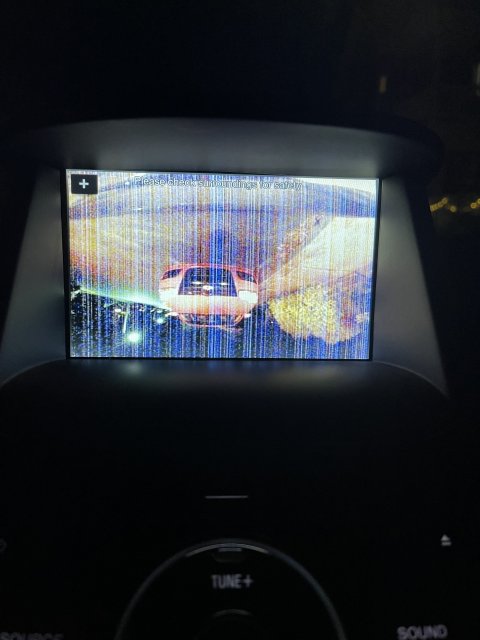
Just gave it a shot and it didn’t work


Sent from my iPhone using Tapatalk


Capri to ST

1000 Post Club
Member ID
#3777
Messages
1,871
Likes
2,413
#11
Just gave it a shot and it didn’t work


Sent from my iPhone using Tapatalk
Oh well, it was worth a try. I always think that's a good place to start because it's quick and easy, and doesn't change any of your settings.
The next step may be a master reset, which will delete all your settings-
If the system reset does not resolve the issue, continue with a master reset.
Performing a master reset
  1. Start your vehicle. Ensure your vehicle is in park and running, not in accessory mode.
  2. Press Settings on your vehicle's SYNC screen.
  3. Choose General.
  4. Scroll down and press Master Reset. A message confirming that all system settings will be erased and reset to factory defaults will appear.
  5. Press Continue. A Resetting to factory defaults message will appear, the system will turn off and the screen will go blank. It may take a few minutes for the system to reset and resume normal operation.
https://www.ford.com/support/how-to...our vehicle's,to factory defaults will appear.
Those two procedures will hopefully iron out any software problems. If they don't work, then you may have a hardware problem.


Intuit

4000 Post Club
Member ID
#4881
Messages
4,228
Likes
2,764
#12
I suspect the fault is in the backup cam module and don't expect the resets to affect it; particularly since the module is powered off between ignition cycles. But as Capri mentioned, don't hurt to try.

I believe they'll need to replace the backup cam module though. Hardware issue...


Member ID
#11243
Messages
440
Likes
414
#13
My wife’s 2018 Flex is having a similar issue. Since it was out of warranty, I paid for the diagnosis and they said it was the camera. They wanted $785 to replace so I said no thanks. But I haven’t gotten around to doing it myself. The camera part it’s self (for the Flex) is $245.

So anyway, I’d concur that its the camera. If you’re under warranty, make the dealer fix it.


Top