• Sign Up! To view all forums and unlock additional cool features

    Welcome to the #1 Fiesta ST Forum and Fiesta ST community dedicated to Fiesta ST owners and enthusiasts. Register for an account, it's free and it's easy, so don't hesitate to join the Fiesta ST Forum today!


High Speed Fan Relay Melted

BigdogRyan

New Member
Messages
1
Likes
1
Location
Canada
#1
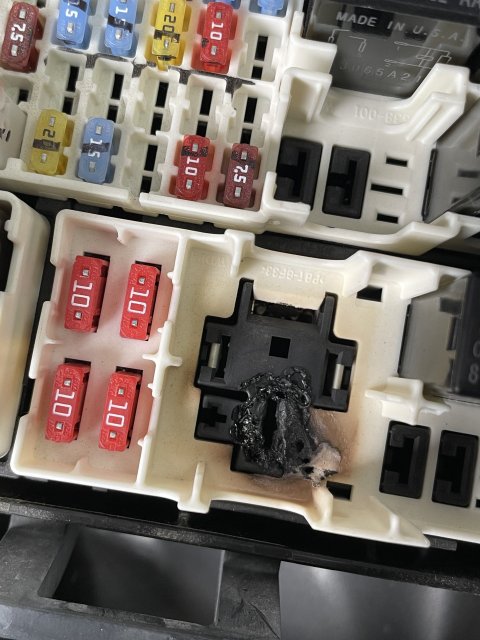
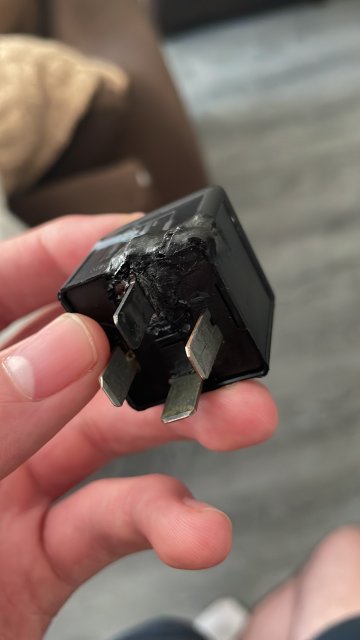
Hey guys, this weekend I got a overheating warning in my 2016 FiST fully stock. I found my high speed fan relay pretty melted and an curious how I can fix this. Can I get away with just plugging in a new relay and monitoring for any burning or melting or should I get this looked into and/or fix the melted part of my fuse box? Thanks


Attachments

Messages
22
Likes
9
Location
SLC, Utah
#2
I know this is an old post but literally the the exact same thing happened to me same prong and appearance on the relay. Was curious what you ended up doing.

My best guess about what caused it is either a poor connect from an improper seated relay or just general corrosion / bad contact between the relay fin and the wiring connector.

I am going to cut out the melted portion of the fuse box and install a new 4 pin connector. Could be the fan was getting old or requesting too much amperage and that is what caused the melting but I don't think so. Since the fan and shroud are 200+$ i'm going to do the new relay and connector first and see what happens. If it occurs again then I know I need to change the fan.

Would be nice to hear what you ended up doing.

Hopefully my answer helps anyone else that has had issues.


Last edited:

Intuit

4000 Post Club
Messages
4,313
Likes
2,836
Location
South West Ohio
#3
the fan was getting old or requesting too much amperage and that is what caused the melting but I don't think so.
You are correct. If you put a fan that drew twice as much amperage as the original, it would simply cause the fuse to fail. If the fuse was replaced with a higher capacity, only then would the contacts and wires on that circuit be subject to overheat due to overload. In other words, it is the fuse that prevents overload and not the fan. Defective fuse, is a possibility and is worth replacing.


what caused it is either a poor connect from an improper seated relay or just general corrosion / bad contact between the relay fin and the wiring connector.
This is also correct. Wasn't necessarily poorly seated.though. High humidity environment may have persisted in the box or/and the contact alloys may have been defective. Check the other relays and contacts.

Speaking in general with these types of failures, a lot of people make the mistake of replacing just the component (whatever it is) while ignoring the contacts that the component plugs into. Whenever either side of a wire harness shows any sign of overheat, BOTH the female and male contacts have to be replaced; no exceptions. Doing just one side or the other means there will be a repeat incident at some point down the road.

When an alloy is overheated or corrodes, its composition shifts or changes. It converts more of the energy passing through it to heat. That heat decreases its conductivity while also accelerating its decomposition/corrosion. The additional corrosion further decreases its conductivity which means even more energy is converted to heat. Basically it's a runaway set of conditions.

Dielectric grease, though an insulator, helps seal out air, moisture (oxygen) which reduces the potential for corrosion (aka oxidation). If there are weather seals, the dielectric grease should go there. If there aren't any weather seals, you might not have a choice but to use it on/around the contacts. Not ideal, but in my decades observations/experiences it is far better than nothing.



Last edited:

Intuit

4000 Post Club
Messages
4,313
Likes
2,836
Location
South West Ohio
#4
BTW, I don't recall the details, but there were some 2016 models that had a recall for the fan relay. Mine was one of them and replaced it immediately during 2017 or 2018. Supposedly the wrong relay was installed at the factory. IIRC the internal hardware wasn't rated for the amount of amperage being pulled through it. That would cause the switch in that relay to overheat and ultimately could be the cause of what occurred here.


Messages
22
Likes
9
Location
SLC, Utah
#5
You are correct. If you put a fan that drew twice as much amperage as the original, it would simply cause the fuse to fail. If the fuse was replaced with a higher capacity, only then would the contacts and wires on that circuit be subject to overheat due to overload. In other words, it is the fuse that prevents overload and not the fan. Defective fuse, is a possibility and is worth replacing.
The fuse was correct rating and intact so that is why I didn't suspect the fan drawing too much amperage.

This is also correct. Wasn't necessarily poorly seated.though. High humidity environment may have persisted in the box or/and the contact alloys may have been defective. Check the other relays and contacts.
I did check the other relays and fuses and they all worked appropriately and the seats all looked good without any signs of overheating or corrosion.

Speaking in general with these types of failures, a lot of people make the mistake of replacing just the component (whatever it is) while ignoring the contacts that the component plugs into. Whenever either side of a wire harness shows any sign of overheat, BOTH the female and male contacts have to be replaced; no exceptions. Doing just one side or the other means there will be a repeat incident at some point down the road.

When an alloy is overheated or corrodes, its composition shifts or changes. It converts more of the energy passing through it to heat. That heat decreases its conductivity while also accelerating its decomposition/corrosion. The additional corrosion further decreases its conductivity which means even more energy is converted to heat. Basically it's a runaway set of conditions.
Yes I have taken this into consideration. Once I accessed the female connectors and the "always hot" cable was obvious burned. I stripped it back to healthy looking copper before putting in my new wiring / connector. All the other connectors and wiring for the 4 prong relay looked healthy without any signs of overheating or damage so I left them alone.

Dielectric grease, though an insulator, helps seal out air, moisture (oxygen) which reduces the potential for corrosion (aka oxidation). If there are weather seals, the dielectric grease should go there. If there aren't any weather seals, you might not have a choice but to use it on/around the contacts. Not ideal, but in my decades observations/experiences it is far better than nothing.
Good idea! I guess I have always assumed that since the fusebox was covered / sealed that it was sufficient to help prevent issues but I don't htink it would be harmful to use conservative amounts of grease to help with insulation.


Messages
22
Likes
9
Location
SLC, Utah
#6
BTW, I don't recall the details, but there were some 2016 models that had a recall for the fan relay. Mine was one of them and replaced it immediately during 2017 or 2018. Supposedly the wrong relay was installed at the factory. IIRC the internal hardware wasn't rated for the amount of amperage being pulled through it. That would cause the switch in that relay to overheat and ultimately could be the cause of what occurred here.
I did see this on the forums and thought that maybe that this could be a culprit as well. I guess I could call the dealership and see if they have the part numbers for the incorrect and the correct relays.

Thank you for your insight. I appreciate your help!


Top